Alert fatigue is real. When your phone buzzes 50 times a day from CI failures, stale PRs,
and deployment issues, you stop looking. But the cost of missing a real issue is even higher.
Here's how to reduce noise without losing signal.
The math behind alert fatigue
Let's do a quick count. For a typical 10-person team using GitHub, a CI tool, a deployment
provider, and an issue tracker:
GitHub: 20-30 notifications/day (PR reviews, CI results, mentions)
CI pipeline: 10-20 notifications/day (success, failure, flaky)
That's 45-75 notifications per day, or 225-375 per week. Studies consistently
show that teams respond to fewer than 30% of these. The rest become background noise —
and when a genuinely critical issue surfaces, it's just one more notification in a sea
of ignored alerts.
Alert fatigue is a dashboard problem, not just a notification problem
The symptom isn’t just the alerts — it’s the tabs. For every notification that
lands in Slack, there’s a corresponding dashboard an engineer has to open to investigate
it: the CI run in GitHub, the failed deployment in Vercel, the open issue in Jira.
Alert fatigue and dashboard switching are the same problem viewed from different angles.
A team drowning in 75 notifications per day is also a team that opens 75 browser tabs
to investigate those notifications. Reducing alert volume reduces tab volume — but only
if you fix the root cause rather than just silencing channels.
Recommended for you
Cut the noise, keep the signal
Deviera aggregates engineering signals and routes them by severity — so the alerts that reach you are the ones that actually need action.
Most teams try two things when alert fatigue sets in:
Turn off notifications — This works until a production incident happens and nobody notices for 45 minutes.
Create separate channels — You end up with #ci-failures, #prs-stale, #deploy-issues, and 10 other channels. Now you have the same problem, just more organized.
Neither approach addresses the root cause: you're being notified per event,
not per condition. And neither approach reduces the number of dashboards
engineers have to open to act on what they’re notified about.
Three mechanisms that actually work
1. Deduplication
The same underlying problem can generate dozens of notifications. A flaky test that fails
5 times in 2 hours generates 5 CI failure notifications. A PR that needs review on Tuesday,
Wednesday, and Thursday generates 3 reminder notifications.
The fix: One notification per underlying condition, not one per event.
If a test is failing, you need one alert saying "test X is flaky" — not a notification
every time it runs. If a PR has been waiting for 48 hours, you need one alert saying
"PR #123 is stale" — not a daily reminder.
2. Severity routing
Not all alerts are equal. A CI failure on main blocks the entire team and
needs an urgent response. A flaky test on a feature branch is annoying but can wait.
A TODO comment in code is technical debt that can be addressed next sprint.
The fix: Classify alerts by severity and route accordingly:
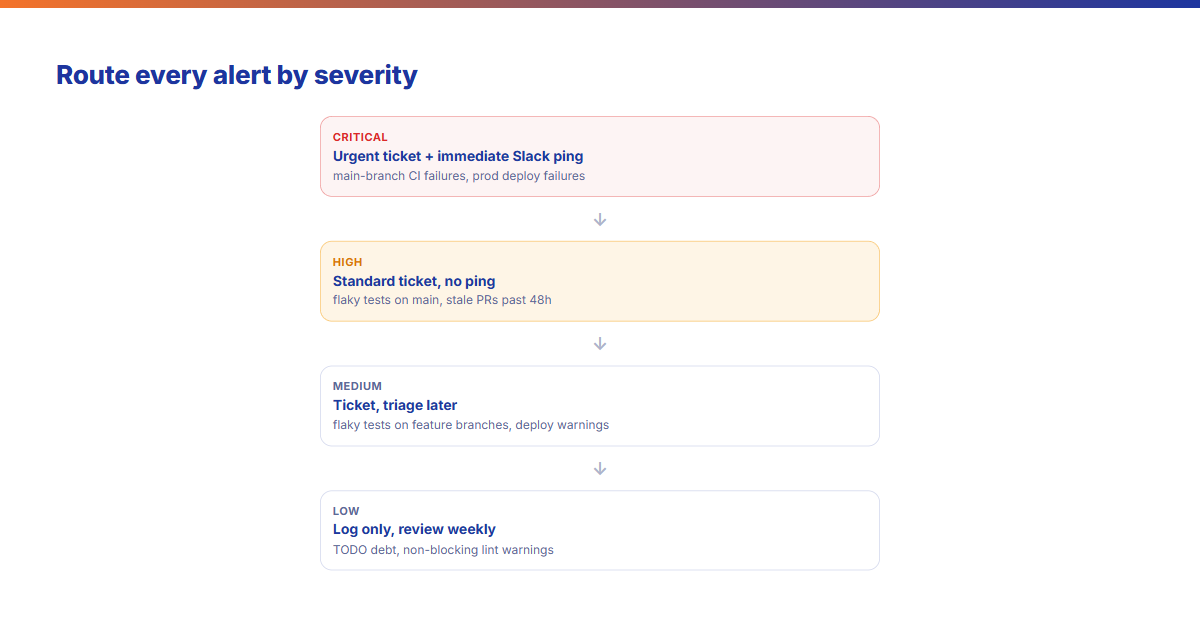
Critical → urgent ticket + immediate Slack ping — main branch CI failures, production deployment failures
High → standard ticket, no immediate ping — flaky tests on main, stale PRs past 48h
Medium → ticket, triage later — flaky tests on feature branches, deployment warnings
Route every alert by severity to a matching destination. The point isn't fewer signals — it's that the urgent ones still land while the low-priority ones stop competing for attention.
This ensures the team responds to what matters and ignores what doesn't.
3. Auto-resolution
Here's what makes alert fatigue worse: alerts that stay "open" even after the problem
is fixed. You fix the bug, merge the PR, but the alert is still there, mocking you.
The fix: Auto-close alerts when the underlying condition clears.
When a flaky test passes again, close the alert. When a stale PR gets reviewed,
close the alert. When a deployment succeeds after a failure, close the alert.
This is the feedback loop that keeps signal-to-noise ratio healthy over time.
What this looks like in practice
A team that implements all three mechanisms typically sees:
70-80% reduction in notification volume
80%+ alert response rate (vs. ~30% before)
Faster incident detection because real issues aren't buried
The key insight: you're not reducing alerts by ignoring problems.
You're reducing alerts by being smarter about what deserves attention.
Getting started
You don't need to rebuild your entire notification system. Start with:
Audit your current alerts: How many do you get per day? Which ones do you actually act on? A response rate below 50% means your noise floor is already too high.
Identify your critical path: What's the one notification type you can never miss? (Probably main branch CI failures.) Protect that signal first before reducing anything else.
Implement severity tiers: Map each alert type to a severity level and corresponding action. Deviera's automation engine lets you configure severity routing without code — trigger on CI failure, classify by branch, route to ticket or Slack based on severity.
Add auto-resolution: When a condition clears, close the alert automatically. See how Slack alert configuration works alongside auto-resolution to keep channels clean.
Your team will thank you. And your production incidents will get caught faster,
not slower.
Tools that reduce engineering alert fatigue
Several categories of tooling address alert fatigue from different angles. Here's
how the main options work — and what each one actually fixes.
PagerDuty / Opsgenie — production incident routing
PagerDuty and Opsgenie are the standard for production on-call alerting. They handle
escalation ladders, on-call schedules, and incident severity routing for production
systems. They are excellent at what they do — but they operate downstream of your
development workflow, not within it. They do not reduce CI noise, stale PR alerts,
or deployment failure notifications during the development phase.
Slack workflows + channel organization
Most teams' first response to alert fatigue is channel segregation — #ci-failures,
#deploys, #pr-reviews. This organizes the noise without reducing it. Engineers
still have to monitor multiple channels and mentally triage every notification.
Slack workflows can add routing logic (post critical alerts here, low-severity there),
but without deduplication and auto-resolution at the source, the volume problem persists.
GitHub notification settings
GitHub's native notification settings allow you to filter by activity type — only
mentions, only review requests, only CI failures. This is a useful first step for
individual engineers. It does not solve the team-level problem: different engineers
filter differently, so the team loses a shared view of what needs attention. And it
does not address cross-tool noise from Vercel, Linear, Jira, or ClickUp.
Deviera implements all three mechanisms that actually work: deduplication (one ticket
per underlying condition), severity routing (critical signals create urgent tickets and
Slack pings; low-severity signals log silently), and auto-resolution (tickets close
automatically when the condition clears). The Signal Feed gives
the whole team a single ranked view of open engineering signals — no tab-switching,
no channel-monitoring, no manual triage. The automation engine handles
the routing rules without code, from a no-code rule builder that maps trigger → severity → action.
Frequently asked questions
What is alert fatigue in engineering?
Alert fatigue in engineering is the state where automated notifications arrive so frequently that engineers stop responding to them — including the ones that matter. It is caused by per-event alerting (one notification per CI run, not per problem), lack of severity filtering (critical and low-priority signals arrive in the same channel), and missing auto-resolution (alerts persist after the underlying issue is fixed). The result: a 30% or lower response rate to automated notifications, meaning 70% of alerts are ignored — including some fraction of genuine incidents.
How do you reduce alert fatigue without missing critical issues?
The three-mechanism approach: deduplication (one alert per condition, not per event), severity routing (critical signals go to urgent Slack pings and tickets; low-severity signals log silently for weekly review), and auto-resolution (alerts close when the condition clears so the open alert list stays meaningful). Applying all three consistently reduces notification volume by 70–80% while increasing response rates to 80%+ — because every open alert in the system represents a genuinely unresolved issue.
What's the difference between alert fatigue and notification fatigue?
Notification fatigue is the broader phenomenon of too many pings across all apps — email, Slack, calendar, news. Alert fatigue is the engineering-specific version: too many automated signals from development tooling (CI, deployments, issue trackers, code review). The mechanisms differ. Notification fatigue is often solved by personal settings. Alert fatigue requires systemic fixes at the team level — deduplication and severity routing cannot be solved by individual engineers adjusting their own settings, because the underlying signal volume affects the whole team regardless of individual filtering choices.
How many alerts is too many for an engineering team?
A useful threshold: if your team's alert response rate drops below 50%, you have too many alerts. Response rate — the percentage of automated alerts that receive a human action within 4 hours — is a more useful metric than raw volume, because the right volume depends on team size, deployment frequency, and CI complexity. A 20-person team deploying 10 times a day will generate more legitimate alerts than a 5-person team deploying twice a week. The signal is not the number — it is whether engineers are acting on what they receive.