
DORA metrics and delivery intelligence, benchmarked in real time.
See your team's delivery performance against industry standards — Deployment Frequency, Lead Time, Change Failure Rate, and MTTR — benchmarked live against the 2025 State of DevOps. Plus PR Cycle Time (median + P75 per repo), a composite Health Score, Investment Distribution by work category, and the automation ROI behind it all. Share any of it with your team lead to prove what Deviera is doing for your delivery.
14-day free trial · No credit card required
What you can measure
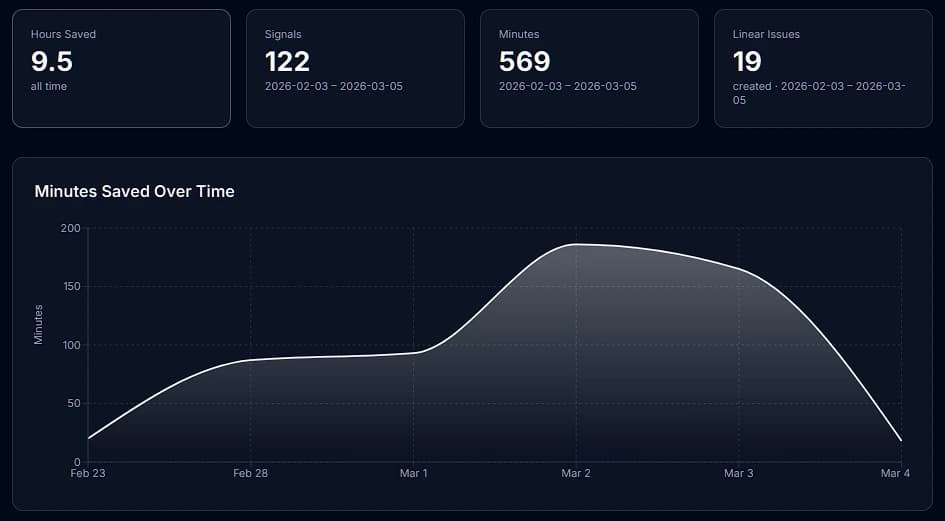
Every automation event is recorded with the trigger type, outcome, severity, and an estimated time saved. The Value Dashboard aggregates these into actionable ROI metrics.
DORA Metrics
Deployment Frequency, Lead Time for Changes, Change Failure Rate, and MTTR — computed automatically from your GitHub and Vercel events, benchmarked against Elite, High, Medium, and Low tiers from the 2025 State of DevOps report.
PR Cycle Time
Median and P75 PR cycle time per repository, benchmarked against DORA Elite (≤4h) through Low (>72h) tiers. Updated continuously as PRs merge.
Health Score
A composite delivery health score combining DORA performance, PR cycle time, and flow metrics — trended over time so you can see whether your team is improving.
Hours saved
Every automation that fires is assigned a time-saved estimate based on the trigger type. CI failures caught automatically save ~30 minutes of manual triage. The dashboard totals these across your workspace.
Automations fired
Total automation executions over any time window — broken down by trigger type, action type, and severity. See which automations are working hardest for your team.
Issues auto-created
How many structured issues Deviera automatically opened in Linear, Jira, or GitLab on your behalf. Each issue includes full context — repo, branch, commit SHA, workflow name, and a reproduction checklist.
Velocity trend
Weekly time-series chart of automation activity. See whether friction is increasing or decreasing over time — and correlate spikes with specific events.
Investment Distribution
Engineering effort breakdown by work category — Growth, Reliability, Maintenance, and Support — derived from PR labels and commit patterns. Know where your team's time is actually going.
PR Bottleneck Radar
Live view of currently-open pull requests that are stalled, oversized, or missing reviewers — fetched directly from GitHub. Spot blocked work before it compounds into shipping delays.
How minutes saved are estimated
Each trigger type has a default time-savings estimate based on the average manual effort avoided when Deviera catches the event automatically. These are conservative baselines — your actual savings depend on team size and workflow.
| Trigger | Default estimate |
|---|---|
| CI failure on main branch | 30 min |
| Flaky test detected | 45 min |
| Stale PR (> 48 h) | 20 min |
| Deployment failure | 30 min |
| Issue labeled "bug" | 10 min |
| PR merged (changelog) | 5 min |
| TODO/FIXME committed | 10 min |
Trigger baselines are configurable per workspace from the workspace settings page.
Full feature breakdown
Time-series chart — daily or weekly automation activity over 7, 30, or 90 days
Top automations — ranked by signals fired, hours saved, and issues created
Breakdown by severity — critical, high, medium, low signal distribution
Breakdown by trigger type — which friction patterns are most active
Auto-close tracking — how many issues were resolved automatically
Per-repo breakdown — which repositories generate the most friction
DORA Metrics — Deployment Frequency, Lead Time, CFR, MTTR against 2025 State of DevOps
PR Cycle Time dashboard — median + P75 per repo, Elite tier benchmarking
Health Score — composite DORA + PR flow + CI health trended over time
Investment Distribution — work category breakdown by Growth, Reliability, Maintenance, Support
PR Bottleneck Radar — live view of stalled, oversized, or reviewer-less open PRs
Available on Pro and above
DORA Metrics, PR Cycle Time, Health Score, Investment Distribution, and the automation ROI dashboards are all unlocked on the Pro plan. Free workspaces see the Signal Feed (30 days) and basic automation stats. All new workspaces start on a 14-day Pro trial — no credit card required.