When you're building automation that interacts with GitHub, you have two options:
GitHub OAuth apps and GitHub Apps. They sound similar, but the differences matter for
security, maintenance, and scalability. This guide breaks down both approaches so
you can choose the right one.
The key difference between a GitHub App and an OAuth App is how they authenticate and
scope access. A GitHub OAuth App acts on behalf of a user and inherits that user's
permissions through a personal access token. A GitHub App is a first-class identity that
installs onto an organization or repository with short-lived, fine-grained installation
tokens — so access is org-scoped, auditable, and survives if the original installer leaves.
For team automation, GitHub Apps are the recommended choice; OAuth Apps are simpler for
quick, user-level scripts.
GitHub App
OAuth App
Token lifetime
Short-lived installation token (1-hour TTL)
Long-lived user token, no expiry
Scope
Organization-scoped
User-scoped (all the user can access)
Permissions
Granular, per-repository
Inherits the user’s permissions
Revocation
Instant on uninstall
Manual token regeneration
Webhooks
Per-installation secrets; fires as the app
Fires as the user
Rate limit
5,000 req/hr per installation (scales)
Shares the user’s 5,000 req/hr
Best for
Production automation, teams
Personal tools, one-off scripts
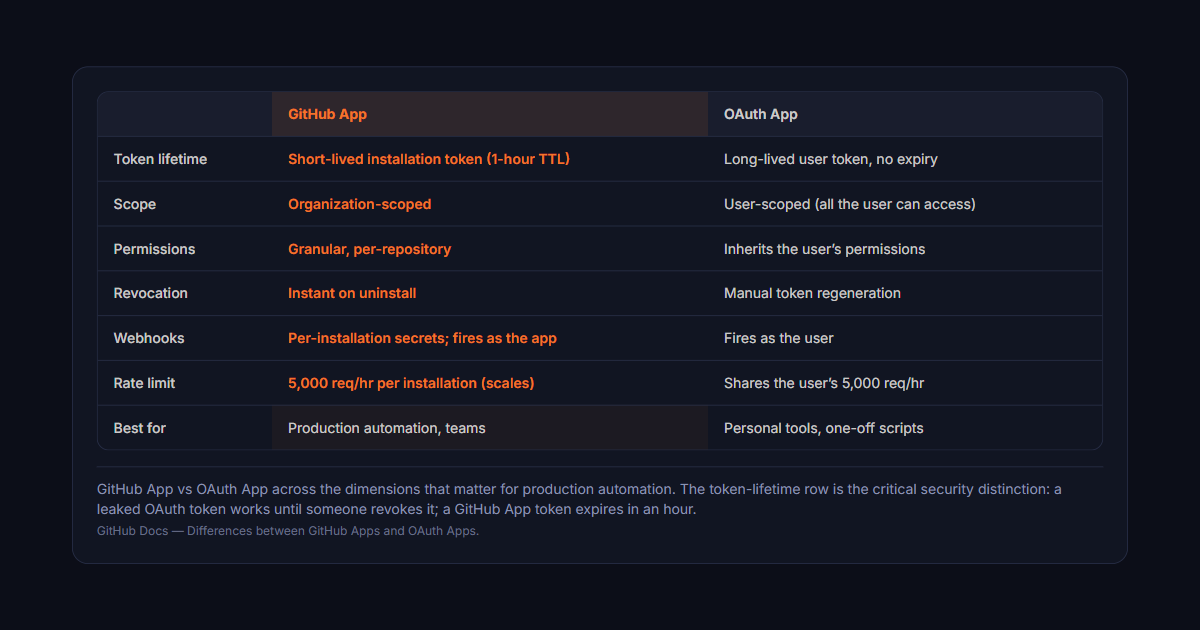
GitHub App vs OAuth App across the dimensions that matter for production automation. The token-lifetime row is the critical security distinction: a leaked OAuth token works until someone revokes it; a GitHub App token expires in an hour.GitHub Docs — Differences between GitHub Apps and OAuth Apps.
What is GitHub OAuth?
GitHub OAuth 2.0 is the traditional way to integrate with GitHub. You authorize an application
to act on your behalf using a client_id and a callback URL. GitHub issues
an access token tied to your user account — the token acts on behalf of the user
who authorized it.
When authorizing OAuth, you grant a set of scopes (e.g., repo, read:org).
The token carries your permissions across all repositories you have access to.
If you're a repo admin, the OAuth token can admin the repo.
If you leave the company and the long lived token is still in use, the integration keeps running
with your credentials — until someone remembers to revoke it.
What is a GitHub App?
A GitHub App is a first-class entity in GitHub. It's an independent actor with
its own identity, permissions, and webhooks — it doesn't belong to any user,
it belongs to the organization or github app installation it's installed on.
When you install a GitHub App, you grant it specific permissions (read issues,
write to pull requests, etc.) scoped to the repositories you choose.
The app authenticates using a JWT and exchanges it for a short lived
installation access token (valid for 1 hour). It acts as itself, not as any particular user.
Recommended for you
Connect GitHub the scoped way
Deviera connects through the GitHub App — scoped, mostly read-only, no broad repo OAuth. See exactly what it accesses before you install.
OAuth App: Issues long lived tokens. They don't expire unless explicitly revoked.
GitHub App: Issues short lived installation access tokens (1-hour TTL). The app re-authenticates via JWT each time, minimizing exposure if a token leaks.
2. Scope
OAuth: User-scoped. Token has your permissions across every repo you can access.
GitHub App: Organization-scoped. App has its own permissions, limited to the repositories you explicitly grant during github app installation.
3. Revocability
OAuth: Revoking access requires regenerating the token manually.
GitHub App: Uninstall the app, access is instantly revoked across all repos.
4. Granularity
OAuth: All-or-nothing. You get all the user's permissions for the requested scopes.
GitHub App: Granular. Install per-repository with specific read/write permissions per resource type.
5. Webhooks and pull requests
OAuth: Webhooks fire as the user. Pull request events are tied to the authorizing user's membership.
GitHub App: Receives webhooks as the app itself, with per-installation webhook secrets. More reliable for pull requests and CI event routing at scale.
6. Rate limits
OAuth: Shares the user's rate limit (5,000 requests/hour).
GitHub App: Has its own rate limit (5,000 requests/hour per installation, scalable with GitHub Enterprise).
What the permissions actually look like
The comparison above is easier to judge with concrete permissions in front of you.
The two models don't just differ in degree — they ask a fundamentally different
question at the consent screen.
An OAuth app requests coarse scopes. To read pull requests and commit
statuses on private repositories, the practical scope is repo — and
repo is not "read pull requests." It grants full read and write
access to code, issues, pull requests, wikis, settings, and deploy keys, on
every repository the authorising user can reach. There is no narrower scope
that gets you private pull request data. An integration that only ever needed to
observe CI results ends up holding push access to every repository that person can
touch, including ones in other organisations entirely.
A GitHub App declares fine-grained permissions per resource, each at
a chosen level:
Pull requests: read-only — enough to see PR state, reviewers, and timing
Checks: read-only — CI results without any ability to modify them
Contents: read-only, or omitted entirely if you never need file contents
Metadata: read-only — mandatory, and the least privileged permission GitHub offers
Issues: read and write, only if you actually create issues
The installing admin then chooses which repositories the app can see — all of
them, or a hand-picked list. The result is an integration that can read pull request
timing on three repositories and do nothing else anywhere. Expressing that with an
OAuth token is simply not possible.
This is also why the token mechanics differ. A GitHub App authenticates as an
installation: it signs a JWT with its private key, exchanges that for an
installation access token, and that token expires after one hour. Short-lived tokens
minted on demand mean a leaked token has a one-hour blast radius. An OAuth token,
by contrast, is valid until someone explicitly revokes it — and nobody notices an
unused token sitting in a log file.
When to use GitHub OAuth
GitHub OAuth is simpler to set up for personal projects or one-off integrations.
Use it when:
You need access to a single user's repositories
You're building a tool for personal use or internal scripts
You don't need fine-grained permission control
You're prototyping before committing to a full GitHub App setup
GitHub OAuth is also the only option for certain GitHub Enterprise Cloud features
that require acting on behalf of the user identity explicitly.
When to use GitHub Apps
GitHub Apps are the right choice for any production automation. Use them when:
You're building a tool for a team or organization
You need fine-grained, per-repository permissions
You want short lived tokens instead of long lived credentials
You need reliable webhook delivery with installation-scoped secrets
You want to avoid "zombie integrations" when people leave
Security implications
The token lifetime difference is the most critical security distinction.
OAuth apps issue long lived tokens — if a token leaks, it's valid until someone
explicitly revokes it. GitHub App installation access tokens expire in 1 hour.
Even if a short lived token is intercepted, its attack window is narrow.
The biggest operational risk is what happens when someone leaves:
OAuth integration: The token still works after the user leaves. You have to remember to revoke it — and in practice, many teams don't.
GitHub App: Uninstalling removes all access instantly. No orphaned credentials, no "authorizing oauth" tokens floating across the organization.
For any automation that touches pull requests, CI status, or repository content in production,
GitHub Apps are the safer choice.
Migration path
If you're currently using GitHub OAuth and want to migrate to a GitHub App:
Create a GitHub App: In org settings → Developer settings → GitHub Apps. Set your callback URL and webhook endpoint.
Define permissions: Choose exactly what the app can access — read issues, write pull requests, receive CI check events.
Install the app: Grant access to specific repositories via the github app installation flow.
Update your code: Use the app's JWT for authentication and exchange it for a short lived installation access token on each request.
Test thoroughly: Verify webhook delivery, pull request events, and API access with the new token type.
Revoke OAuth access: Once the app is working, remove the long lived OAuth tokens from your organization's authorized applications.
The bottom line
For production automation, GitHub Apps are the clear winner. Short lived installation access tokens,
granular permissions, instant revocation, and org-scoped identity make them the secure default
for any team-facing integration. GitHub OAuth remains useful for personal tools and scripts
where the simplicity tradeoff is worth it.
Deviera uses a GitHub App (not OAuth) for exactly this reason — per-installation
webhook secrets, org-scoped permissions, and short lived tokens with automatic rotation.
See how the
GitHub integration
works, or explore the
automation templates
that run on top of it.
Frequently asked questions
What are the differences between GitHub Apps and OAuth Apps?
They differ across six dimensions. Token lifetime: OAuth Apps issue long-lived tokens that don't expire until revoked, while GitHub Apps issue short-lived installation access tokens (1-hour TTL) re-authenticated via JWT. Scope: OAuth is user-scoped (the token carries your permissions across every repo you can access), while a GitHub App is organization-scoped with its own permissions limited to the repositories you grant. Revocability: revoking OAuth means regenerating the token, while uninstalling a GitHub App revokes access instantly across all repos. Granularity: OAuth is all-or-nothing for the requested scopes, while GitHub Apps allow per-repository, per-resource read/write permissions. Webhooks: GitHub Apps receive events as the app itself with per-installation webhook secrets, which is more reliable for PR and CI routing at scale. Rate limits: OAuth shares the user's 5,000 req/hour, while a GitHub App gets its own 5,000 req/hour per installation. For production, team-facing automation GitHub Apps are the recommended choice; OAuth is simpler for personal, user-level scripts.
Should I use a GitHub App or an OAuth App for production automation?
Use a GitHub App for any team or organization automation. Short-lived installation tokens narrow the blast radius if a token leaks, granular per-repository permissions follow least privilege, instant revocation on uninstall avoids 'zombie integrations' when someone leaves, and org-scoped identity means the integration doesn't break when the original installer departs. OAuth Apps remain useful for personal tools, internal scripts, prototyping, or the specific GitHub Enterprise Cloud features that require acting explicitly on behalf of a user identity.