A broken main branch is one of the most expensive problems in software development.
It stops the entire team. Here's the math on why it costs so much — and the
playbook to get back to green in under 10 minutes.
The hidden cost of a red main
When main branch CI fails, the impact cascades immediately:
All new PRs are blocked: Even if your PR is perfect, you can't merge if main is red.
Everyone stops working: Engineers don't want to build on a broken foundation.
Context switching begins: The team pivots from feature work to "fix main."
Time-to-recovery expands: Without a playbook, debugging takes hours.
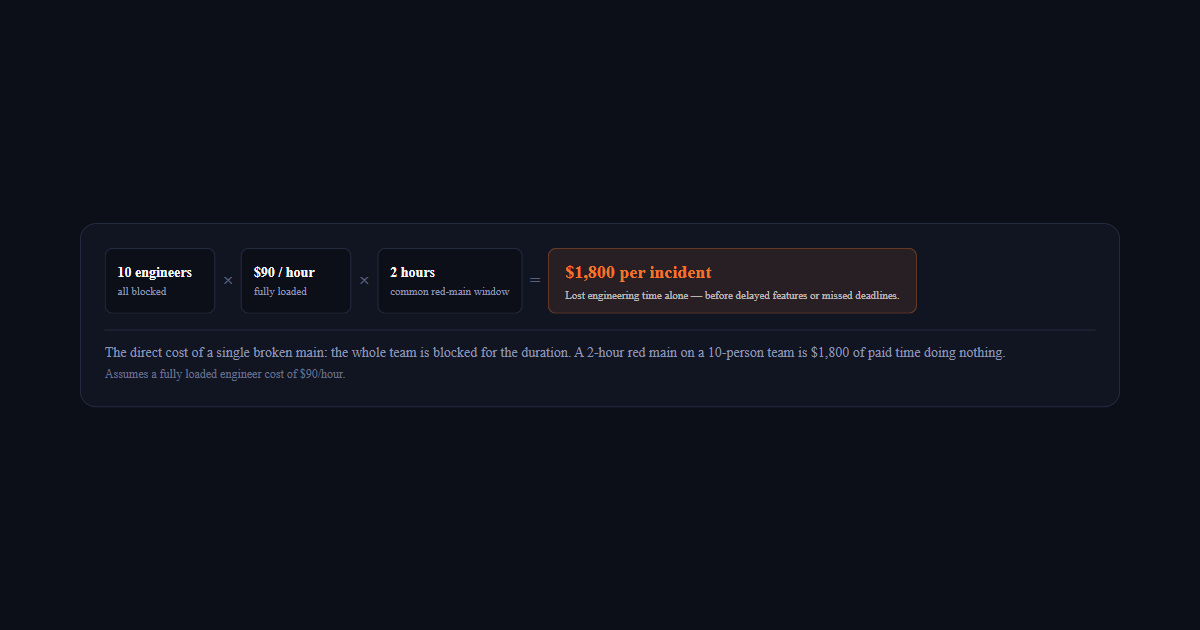
Let's do the math. A 10-person team, all making $90/hour fully loaded. Main is
broken for 2 hours (a common scenario). That's $1,800 in lost engineering
time — just from the team being blocked. That's before you count the
opportunity cost of delayed features, missed deadlines, and stressed engineers.
10 engineersall blocked
×
$90 / hourfully loaded
×
2 hourscommon red-main window
=
$1,800 per incidentLost engineering time alone — before delayed features or missed deadlines.
The direct cost of a single broken main: the whole team is blocked for the duration. A 2-hour red main on a 10-person team is $1,800 of paid time doing nothing.Assumes a fully loaded engineer cost of $90/hour.
CI Health Score Calculator
How healthy is your main branch, really?
A red main costs blocked engineers by the hour. Deviera grades your CI against DORA benchmarks so you can see how often main breaks — and how fast you recover.
Most teams don't have a documented recovery process. When main breaks:
Someone notices (usually via Slack notification)
They ping the channel: "who broke main?"
People check their recent commits
Someone attempts to reproduce locally
Debugging begins (without context from CI logs)
Eventually someone finds and fixes it
This process takes 1-3 hours on a good day. Sometimes it's a full day.
The recovery playbook
Here's a process that gets main back to green in under 10 minutes:
Step 1: Detect immediately (0-30 seconds)
You should know main is red before anyone on the team checks. Configure alerts
that page the on-call engineer the instant main CI fails — no waiting for
someone to notice in Slack.
Step 2: Identify the commit (0-2 minutes)
Don't ask "who broke it?" in Slack. Look at the CI failure: it tells you exactly
which commit failed. Use git log --oneline -10 to see recent commits,
but the CI failure itself usually points you to the exact change.
Step 3: Revert, don't debug (2-5 minutes)
The fastest path to green is reverting the failing commit, not fixing it.
You can always investigate and fix in a follow-up PR. The priority is restoring
the team's ability to work.
git revert HEAD git push origin main
This assumes the failure is obvious. If it's not clear what broke, revert the
last 2-3 commits until green.
Step 4: Verify green (5-8 minutes)
Wait for CI to pass on the revert. If it passes, you're done. If not, there's
something else wrong (maybe a flaky test, or a pre-existing failure).
Step 5: Investigate after (8+ minutes)
Now that the team can work, investigate what actually broke. Was it a test
that was already flaky? A legitimate regression? A CI infrastructure issue?
Document what happened so you can prevent it next time.
Making this automatic
The manual playbook above works, but you can automate parts of it:
Auto-page on main failure: Don't rely on Slack. Page the on-call engineer.
Auto-create revert PR: When main fails, create a PR that reverts the failing commit.
Track MTTR: Measure mean time to recovery. Set a target (e.g., "under 10 minutes").
What you need to implement this week
Alert on main CI failure: Configure your CI to page someone, not just post to Slack.
Document the revert command: Put git revert HEAD && git push in your runbook.
Measure your MTTR: Track how long it takes to get back to green. Set a team goal.
Run a fire drill: Intentionally break main and practice the recovery. Do this quarterly.
The goal isn't to celebrate breaking main. It's to make sure when it happens,
it costs the team 10 minutes, not 2 hours.
Frequently asked questions
What does a broken main branch actually cost?
The direct cost is small; the compounding cost is not. While main is red, every engineer who pulls it inherits a broken baseline and cannot tell their own failures from the existing one. Merges continue on top of a build nobody has verified, so by the time the original break is fixed, several changes have landed against it. The cost scales with team size and with how long the red lasts — which is why time-to-green matters far more than failure count.
Who should fix a red main branch?
Whoever broke it, and the assignment should be automatic rather than negotiated. The most common failure mode is diffusion of responsibility: everyone sees the alert, nobody is named, and the fix waits for someone to volunteer. Attributing the failure to the last committer and assigning it immediately removes the negotiation. If the committer is unavailable, revert first and investigate afterwards — reverting is nearly always cheaper than leaving main red while waiting for the right person.
Should you revert or fix forward when main breaks?
Revert by default, fix forward by exception. Reverting restores a known-good state in minutes and returns the fix to normal review, whereas fixing forward means writing a change under time pressure against a build you cannot fully verify. Fix forward only when the revert is genuinely harder than the fix — a database migration already applied, for example. Teams that treat revert as an admission of failure end up with much longer red periods than teams that treat it as routine.
How quickly should a broken main branch be fixed?
Under an hour is a reasonable target for most teams, and the number that matters is time-to-green rather than how many times the build broke. Frequent short breaks are a healthy sign of a fast pipeline catching real problems. Rare long breaks are the dangerous pattern, because they usually mean nobody owns recovery and the team has quietly adapted to working around a red main.