Daily dashboards are too noisy. Quarterly OKRs are too slow. A weekly engineering
health report gives you the right cadence to spot trends, catch problems early,
and make adjustments before they become crises.
The case for weekly
Here's why weekly is the sweet spot for engineering health reporting:
Daily is too noisy: Single-day variations are rarely meaningful. A bad Tuesday doesn't mean there's a problem.
Monthly is too slow: By the time you see a monthly trend, you've already lost weeks of opportunity to intervene.
Quarterly is crisis mode: Quarterly reviews are for OKRs, not operations. You shouldn't be surprised by quarterly metrics.
Weekly gives you enough signal to see real trends without the noise of daily fluctuations.
Recommended for you
Generate the report automatically
Deviera builds your weekly engineering health report from real GitHub and CI signals — DORA tiers, friction, and trends — so you stop assembling it by hand.
Blocked PRs (48h+) · stale issues (7d+) · open incidents
Where is work stalling?
Friction signals
Friction Score · alert volume + response rate · time in maintenance
How much overhead is the team carrying?
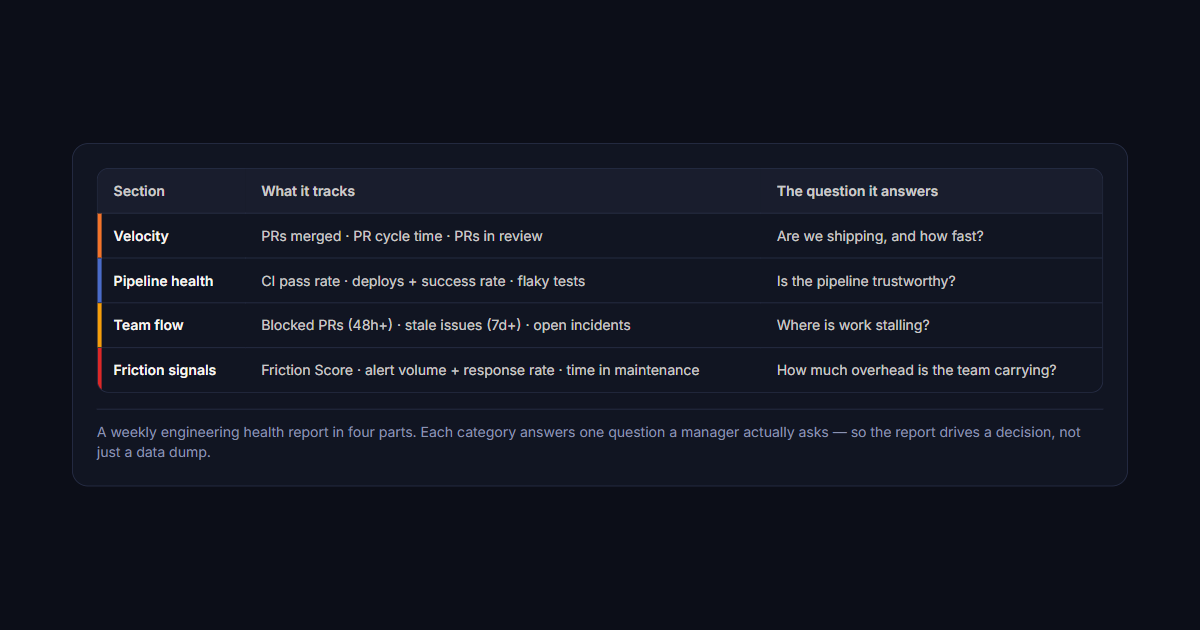
A weekly engineering health report in four parts. Each category answers one question a manager actually asks — so the report drives a decision, not just a data dump.
Velocity metrics
PRs merged: Total count, compared to last week
PR cycle time: Average time from open to merge
PRs in review: How many are waiting, how long have they been waiting
Pipeline health
CI pass rate: Percentage of runs passing on first attempt
Deploys: Count of production deploys, success rate
Flaky tests: Any tests that failed 3+ times this week
Team flow
Blocked PRs: PRs waiting on external review for 48+ hours
Stale issues: GitHub issues with no activity in 7+ days
Open incidents: Active incidents, time in current state
Friction signals
Friction Score: Aggregated measure of active engineering friction
Alert volume: Total alerts this week, response rate
Time in maintenance: Hours spent on operational work vs. features
What to ignore
These metrics are tempting but not useful for weekly reporting:
Code coverage: Too slow-moving to matter week-over-week
Lines of code: Measures input, not output
Story points: Estimates, not measurements
Individual performance: Weekly reports are for team health, not evaluations
The structure of a good report
A weekly engineering health report should be one page, delivered Monday morning,
and contain:
Headline: One sentence on overall team health ("Team is healthy" / "2 areas of concern")
Key metrics: 5-7 numbers with week-over-week comparison
Trends: 2-3 observations about what's getting better or worse
Action items: Anything that needs attention this week
Keep it under 5 minutes to read. Nobody reads a 10-page engineering report.
Making it automatic
You shouldn't be manually assembling this report. Automate the data collection:
Pull from GitHub API: PR counts, cycle times, review times
Pull from CI: Pass rates, deploy counts, flaky tests
Pull from issue tracker: Open issues, stale items, incident count
Generate and email: Create a template, populate with data, send Monday morning
This takes about 2 hours to set up and then runs itself forever.
What to do with the report
A report is only useful if someone acts on it. Use the weekly report to:
Start the week aligned: Spend 10 minutes in team sync reviewing the report
Prioritize attention: If PR review time is up 40%, that's the priority this week
Escalate patterns: If a trend continues for 3+ weeks, escalate to team lead
The goal isn't to create a report. The goal is to have a feedback loop that
keeps the team healthy. Deviera sends a
Weekly Engineering Health Report
every Monday automatically — pre-populated with your Friction Score, PR cycle time,
CI pass rate, and deploy frequency — so you're not assembling it by hand. See the
4 engineering velocity metrics
that should anchor every weekly report.
Frequently asked questions
What should a weekly engineering health report include?
Four categories cover almost everything useful: delivery (PRs merged, cycle time), pipeline health (CI pass rate, flaky test count), flow (work in progress, stale PRs), and friction signals (incidents, failed deploys, alert volume). Each should answer a question a lead would actually ask rather than simply report a number. The discipline that matters most is exclusion — a report with six metrics people read beats one with twenty they skim.
Why weekly rather than daily or monthly?
Daily is noise. Engineering metrics have too much day-to-day variance for a 24-hour delta to mean anything, so daily reports train people to ignore them. Monthly and quarterly are too lagging: by the time a quarterly review shows cycle time doubled, the cause is months old and the context is gone. A week is long enough to smooth out variance and short enough that the cause of a change is still recoverable from memory.
Who should receive the engineering health report?
The team it describes, first. Reports written only for leadership become performance theatre and quietly incentivise gaming the numbers. When the team sees the same report at the same time, the metrics stay diagnostic rather than evaluative. Share it upward as well, but as the same artifact — a separate executive version is where honest reporting usually starts to erode.
How do you stop a weekly report becoming a metric nobody reads?
Attach a decision to it. A report that only describes state gets skimmed; one that names the single thing worth changing this week gets acted on. The practical test is whether last week's report changed anything. If three consecutive reports produced no decision, the problem is either the metric selection or the fact that nobody owns following up, and adding more charts fixes neither.