If your velocity metric is "story points completed," you're measuring estimates,
not output. The truth about how fast your team ships lives in your deployment
data and code review patterns. Here are the four metrics that actually predict
shipping pace.
Why story points fail
Story points are a planning tool, not a measurement tool. They measure what the
team expected to complete, not what actually shipped. A team can have
"high velocity" (lots of story points completed) while deployments are down,
PRs are stalling, and code isn't reaching production.
The four metrics below measure actual engineering output, not estimates.
Metric 1: Deployment frequency
What it measures: How often code reaches production (or staging,
if you deploy to staging before prod).
Why it matters: Teams that deploy frequently are teams that
ship. Deployment frequency is the most direct measure of shipping pace.
Benchmarks:
Elite: Multiple times per day
High: Once per day to once per week
Medium: Once per week to once per month
Low: Less than once per month
How to measure: Count unique deployments to production per week.
Most CI/CD platforms (GitHub Actions, Vercel, CircleCI) expose this via API.
Recommended for you
Track your velocity metrics automatically
Connect GitHub and Deviera computes deployment frequency, PR cycle time, and DORA tiers for you — benchmarked against 2025 State of DevOps.
What it measures: Time from PR opened to PR merged.
Why it matters: Long PR cycle times indicate bottlenecks in code
review, excessive rework from late feedback, or just general stagnation.
This metric is the single best predictor of delivery speed.
Benchmarks:
Elite: Under 4 hours
High: 4-24 hours
Medium: 24-48 hours
Low: Over 48 hours
How to measure: Pull data from GitHub's PR API. Calculate
average cycle time across all PRs in a given period.
Metric 3: PR review time
What it measures: Time from PR opened to first review comment.
Why it matters: This is the "time to first response" for code.
If it takes 24 hours to get a first review, the author loses context and the
whole process stretches. This metric catches bottlenecks before they compound.
Benchmarks:
Elite: Under 1 hour
High: 1-4 hours
Medium: 4-24 hours
Low: Over 24 hours
How to measure: Use GitHub's PR events API. Calculate time
between pull_request opened and first pull_request_review event.
Metric 4: CI pass rate on main
What it measures: Percentage of CI runs on main branch that
pass on first attempt.
Why it matters: Low CI pass rate means engineers spend time
re-running tests, investigating failures, and waiting for green builds.
This eats into the time available for new work.
Benchmarks:
Elite: 95%+ pass rate
High: 85-95% pass rate
Medium: 70-85% pass rate
Low: Under 70% pass rate
How to measure: Query your CI provider's API for workflow runs
on the main branch. Calculate pass rate (not total runs, but first-attempt passes).
PR cycle time: How fast is code moving through review?
PR review time: How fast is code getting first feedback?
CI pass rate: Is your pipeline healthy?
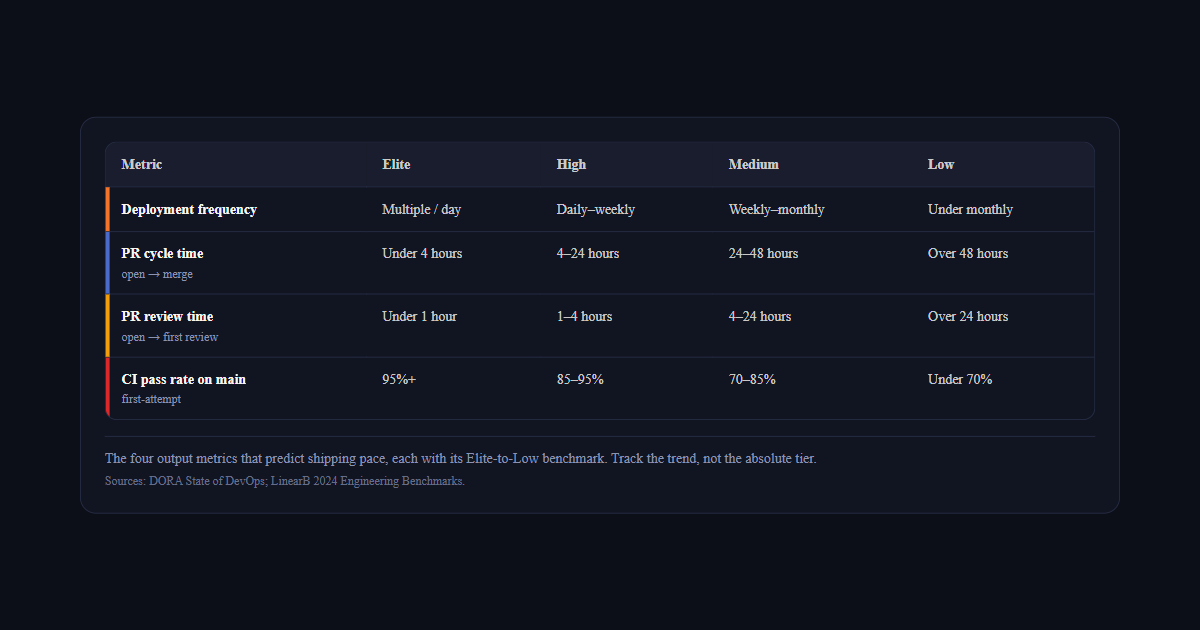
Metric
Elite
High
Medium
Low
Deployment frequency
Multiple / day
Daily–weekly
Weekly–monthly
Under monthly
PR cycle timeopen → merge
Under 4 hours
4–24 hours
24–48 hours
Over 48 hours
PR review timeopen → first review
Under 1 hour
1–4 hours
4–24 hours
Over 24 hours
CI pass rate on mainfirst-attempt
95%+
85–95%
70–85%
Under 70%
The four output metrics that predict shipping pace, each with its Elite-to-Low benchmark. Track the trend, not the absolute tier.Sources: DORA State of DevOps; LinearB 2024 Engineering Benchmarks.
Track these weekly. Look at trends, not absolute values. A team moving from
"once per month" to "once per week" deployment frequency is improving,
even if they're not at "elite" yet. The weekly engineering health report format
is a practical way to track all four metrics together without building a custom dashboard.
And remember: these metrics measure output, not input. They're not gameable
by increasing estimates or under-promising. They measure what actually happened,
and that's what matters. Deviera's Value Dashboard tracks
all four automatically — deployment frequency, PR cycle time, CI pass rate, and
MTTR — updated in real time from your connected GitHub, GitLab, and Vercel integrations.
Want to see where your team stands right now? Use our free calculators to
benchmark your numbers against DORA tiers instantly — no signup required:
PR Cycle Time Calculator — enter your review lag and merge time, get your performance tier. If you use Deviera, the live PR Cycle Time dashboard computes this automatically from your real GitHub events — no manual input.
DORA Metrics Calculator — benchmark all four DORA metrics and see which tier your team is in
Where can I find software that updates velocity metrics automatically?
Any tool that reads your Git and CI events can compute these four continuously — LinearB, Swarmia, and Deviera all do it. What separates them is what happens after the number moves: reporting tools show you the dip, automation tools route it to an owner. If nobody acts on the dashboard today, pick the one that opens a ticket.
How to track engineering velocity metrics automatically
Manually pulling GitHub API data into a spreadsheet every week works for one sprint.
By sprint four, nobody is doing it. Here's how the main tracking options compare.
GitHub Insights
GitHub's built-in Insights tab shows contribution graphs, PR throughput, and code
frequency at the repository level. It gives you a rough picture of activity but
no calculated metrics — no cycle time, no pass rate, no MTTR. It's also
repository-scoped: if your team works across 5 repositories, you have 5 separate
Insights pages with no aggregate view. Useful as a sanity check, not as a
primary velocity tracking system.
LinearB
LinearB is purpose-built for engineering velocity metrics. It connects to GitHub
and GitLab and calculates PR cycle time, deployment frequency, and review metrics
per engineer, per team, and per repository — with historical trend charts and
DORA tier classifications. It's the most complete retrospective reporting tool in
this category. Where it is lighter: real-time alerting when metrics breach thresholds,
and automated action (ticket creation, Slack alerts) when velocity drops.
Swarmia
Swarmia tracks velocity metrics with a developer experience lens — highlighting
focus time, review load balance, and interrupt rates alongside cycle time data.
Strong for teams where the root cause of velocity problems is workload distribution
rather than CI health or deployment pipeline issues. Less focused on CI pass rate
and deployment frequency tracking specifically.
Deviera
Deviera is an engineering intelligence platform that
tracks all four velocity metrics continuously and takes action when they
degrade — automatically creating tickets when CI pass rate drops, alerting Slack
when PRs go stale past the review time threshold, and logging Vercel deployment
failures with structured context. The Friction Score
aggregates CI health, PR flow, and deployment stability into a single 0–100 metric.
The Value Dashboard shows
deployment frequency, PR cycle time, CI pass rate, and MTTR in one view.
The DORA Calculator lets
you benchmark your current numbers against the four performance tiers instantly.
How engineering leaders drive engineering velocity improvement
Measuring engineering velocity is only the first step. The harder work is improving it.
Engineering leaders who consistently raise their team's velocity tend to focus on the
same set of levers — and the data almost always points to the same root causes.
Reduce context switching
Context switching is one of the most underestimated velocity killers. Every time a developer
switches between a GitHub issue, a Slack thread, a Jira ticket, and a CI dashboard, they lose
5-15 minutes of deep work. For a 10-person team handling 20 context switches per developer per
day, that's 30-50 hours of lost productivity per week — more than one full engineer's output.
The fix isn't asking people to focus harder. It's consolidating signals: routing CI failures
directly to issue trackers, linking pull requests to tasks automatically, and surfacing
team performance data in one place instead of five.
Address technical debt before it compounds
Technical debt degrades engineering velocity gradually and invisibly. Flaky tests slow CI.
Undocumented code requires re-learning every time someone touches it. Deprecated dependencies
block upgrades. Engineering leaders who track technical debt as a first-class metric —
not just a backlog category — keep velocity from eroding quarter over quarter.
The signal to watch: if your CI pass rate and deployment frequency are stable but PR cycle
time is creeping up, technical debt accumulation is usually the cause. Problem solving
on individual PRs is taking longer because the codebase is harder to change safely.
Align metrics with business goals
Engineering velocity metrics are most useful when tied to business goals. Deployment frequency
maps to release cadence. PR cycle time maps to feature lead time. CI failure rate maps to
customer-facing reliability. When engineering leaders present these metrics in terms of
business outcomes — not just team performance numbers — they get the investment and
organizational support needed to actually improve them.
Measuring velocity without connecting it to business goals creates a reporting exercise.
Connecting it creates a feedback loop that engineering leaders, product managers, and
executives can all act on together.
Frequently asked questions
What metrics should I track to see if automated reviewers are increasing engineering velocity?
To tell whether automated reviewers (AI review bots, automated linters, or auto-assignment) are actually increasing velocity, track four metrics before and after rollout: (1) PR pickup time — the gap between PR opened and first review, which automated assignment should shrink directly; (2) PR cycle time — open to merge, the bottom-line velocity measure; (3) review churn — the number of author↔reviewer round-trips per PR, which good automated review should reduce by catching issues earlier; and (4) change failure rate / CI pass rate on main, to confirm faster reviews aren't trading speed for quality. If pickup time and cycle time drop while change failure rate holds steady or improves, the automated reviewers are genuinely increasing velocity rather than just moving work around. Watch cycle time and CFR together — a velocity gain that raises CFR is a false positive.
Do automated code reviewers actually improve engineering velocity?
Automated reviewers improve velocity when they reduce pickup time and review churn without raising change failure rate. The fastest wins come from auto-assigning reviewers (eliminating the 'who reviews this?' delay) and catching mechanical issues before a human looks. The risk is reviewers rubber-stamping AI-flagged PRs; guard against it by tracking change failure rate alongside cycle time so a speed gain that hurts quality shows up immediately.
What are engineering velocity metrics?
Engineering velocity metrics are objective measurements of how fast and reliably a software team ships code to production. The most predictive ones — validated by the DORA research program across thousands of teams — are deployment frequency (how often code reaches production), PR cycle time (how long code takes to move from PR to merge), CI pass rate on main (what percentage of builds succeed on first attempt), and mean time to recovery (how quickly the team restores a green build after a failure). These four metrics predict business outcomes — revenue growth, profitability, customer satisfaction — more reliably than any input-based metrics like story points or hours worked.
Why are story points a bad measure of engineering velocity?
Story points measure estimates, not output. A team can complete every story point in a sprint while shipping nothing to production — if deployments are blocked by CI failures, PRs are stuck in review, or the release process requires manual steps. Story points also inflate over time: teams unconsciously calibrate estimates upward to maintain the appearance of consistent velocity. The four DORA metrics cannot be gamed this way — deployment frequency is a count of actual deployments, PR cycle time is a timestamp difference, CI pass rate is a ratio of observed outcomes.
How often should you review engineering velocity metrics?
Weekly for trend detection, monthly for strategic decisions. Weekly review catches degradation early — a CI pass rate dropping from 92% to 78% over three weeks is a signal worth acting on before it compounds into blocked deployments. Monthly review is the right cadence for comparing against DORA benchmarks, presenting to leadership, and making staffing or tooling investment decisions. Daily review of raw metrics creates noise — individual build failures and slow PRs are normal variance, not signals. Track the 7-day rolling average, not the daily number.
What is a good engineering velocity for a software team?
'Good' is relative to your current baseline and trajectory, not an absolute number. That said, DORA's elite performer benchmarks are the most widely validated reference points: deployment frequency multiple times per day, PR cycle time under 4 hours, CI pass rate above 95%, MTTR under 1 hour. Most teams are not elite performers — the median team in DORA research deploys once per week and has a PR cycle time of 24–48 hours. The useful question is not 'are we elite?' but 'are we improving quarter over quarter?' — a consistent upward trend in all four metrics is a stronger signal of team health than hitting a single benchmark once.