Mean Time to Restore (MTTR) is the DORA metric that exposes your incident response capabilities. Elite teams restore service in under one hour. Low performers take more than a week. The difference isn't team size or budget — it's five specific practices that compress the time from detection to recovery.
What is MTTR in DORA metrics?
MTTR (Mean Time to Restore) measures how long it takes to recover a service after a deployment-caused failure in production. It's one of the four DORA metrics validated by the DevOps Research and Assessment team.
The clock starts when the incident begins (either when it's detected or when the failed deployment landed) and stops when the service is restored to normal. MTTR is sometimes also called Mean Time to Recovery or Mean Time to Repair — they're all measuring the same window.
DORA Metrics Calculator
Where does your MTTR rank?
MTTR is one of the four DORA keys. Enter yours alongside the other three to see your tier against the 2025 State of DevOps benchmarks in seconds.
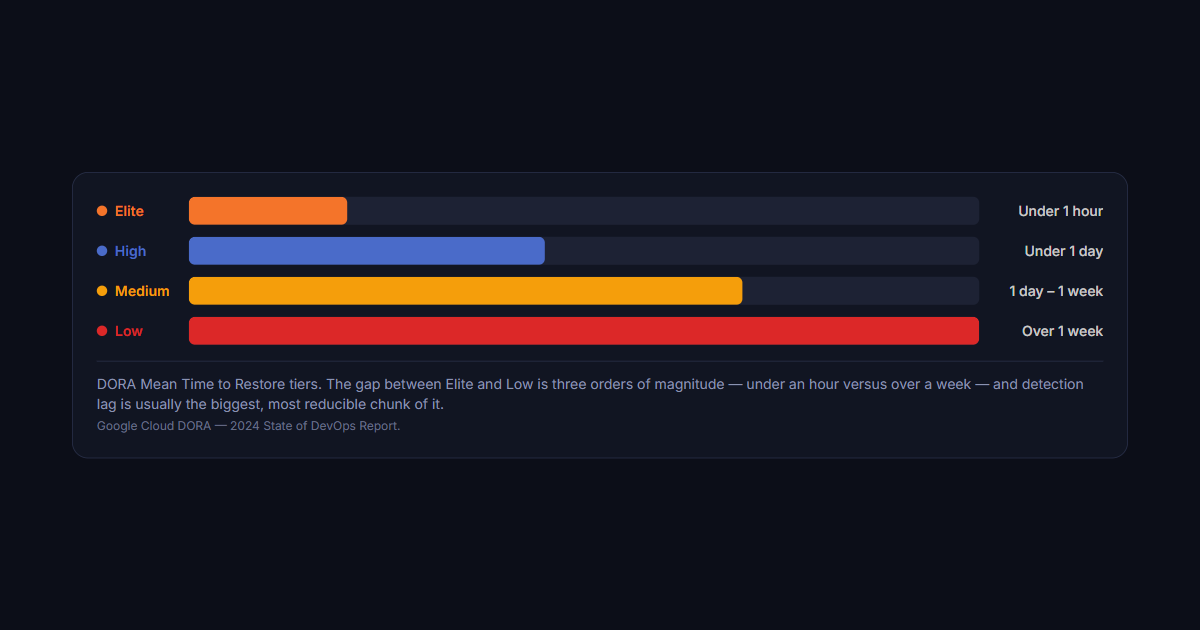
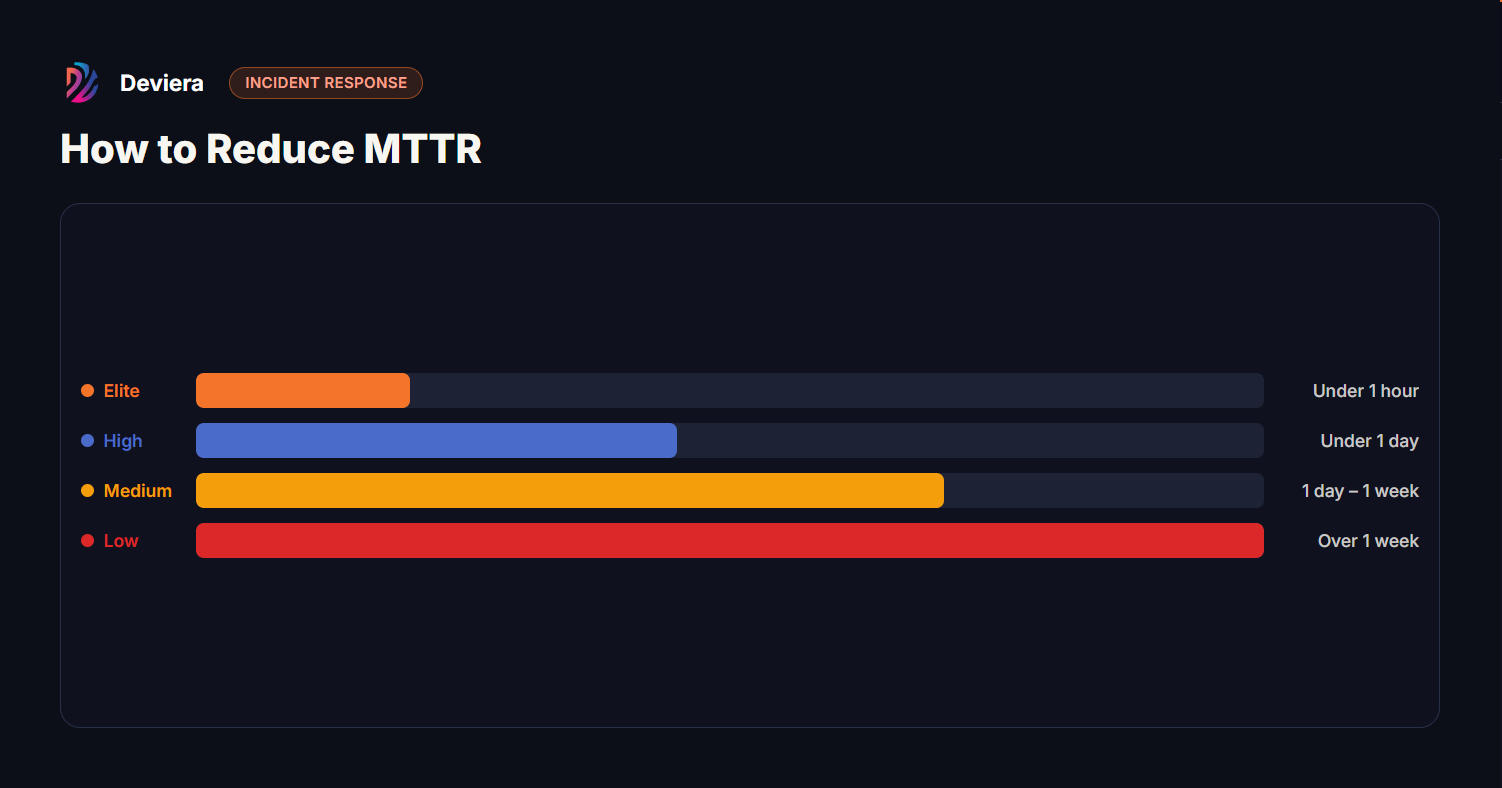
DORA Mean Time to Restore tiers. The gap between Elite and Low is three orders of magnitude — under an hour versus over a week — and detection lag is usually the biggest, most reducible chunk of it.Google Cloud DORA — 2024 State of DevOps Report.
Most teams underestimate their actual MTTR because they measure it from when an engineer is paged — not from when the incident started. Detection lag (the time between failure and alert firing) is often the largest component of MTTR and the easiest to reduce.
5 practices that reduce MTTR
Step 1Cut detection lagAlert on customer-facing symptoms, not infra causes
→
Step 2Practice runbooksTop-5 incidents, quarterly game days
→
Step 3One-click rollbackTag every deploy; redeploy previous in one command
→
Step 4Auto-create incidentsTicket on deploy/health-check failure — no manual triage
→
Step 5Auto-resolveClose the incident when CI goes green again
The five practices in order of leverage — each compresses a different part of the detection-to-recovery window. The first and last (detection lag, auto-resolution) are where most teams are silently losing hours.
1. Fix detection lag — alert on symptoms, not causes
Detection lag is the time between when a failure begins and when your team learns about it. For teams with MTTR over a day, detection lag is usually the culprit — not slow response time.
The root cause: alerting on causes (service crashed, pod restarted) instead of symptoms (customers experiencing errors). Service crashes often recover via auto-restart within 30 seconds. Customer-facing errors persist. Alert on the customer experience, not the infrastructure event.
Practical fix: set up error rate alerts on your primary user flows with a 5-minute evaluation window. If error rate exceeds baseline × 3, page. This fires on real customer impact regardless of whether the infrastructure looks healthy.
2. Build and practice runbooks for your top 5 incidents
The single biggest predictor of fast MTTR is whether the responder knows what to do without having to research it. Most teams have runbooks. Most runbooks haven't been updated since the person who wrote them left.
Effective runbooks have four sections: (1) how to confirm this incident type, (2) what to check in what order, (3) the rollback/fix steps with exact commands, (4) how to verify the fix worked. Review your last 10 incidents. Write or update the runbook for any incident that took more than 30 minutes to diagnose. Then require oncall engineers to run a game day — simulate the incident without production impact — once per quarter.
3. Enable one-click rollbacks
Rollback time is a major MTTR component for deployment-caused failures. If rolling back requires a manual deploy, approval gates, or a Slack thread to find who has permissions, you've added 20–40 minutes to every deployment-caused incident.
Modern deployment platforms (Vercel, Fly.io, Render) support one-click instant rollbacks. For custom infrastructure: tag every deployment in your CD pipeline with a unique ID, and create a runbook step that redeploys the previous tag with a single command. Test the rollback process — don't discover it's broken at 2am.
4. Automate incident creation from deployment failures
When a deployment fails or a health check fires, an incident ticket should be created automatically — not after an engineer pings #incidents and someone manually creates a Jira issue 15 minutes later. That 15-minute gap is pure overhead on every incident.
Deviera's
automation engine
can create incidents in Linear, Jira, or ClickUp automatically when Vercel deployment failures or CI health check failures are detected — with structured context (which deployment, which repo, which branch). No manual triage, no context switching.
5. Reduce MTTR with auto-resolution tracking
Many incidents resolve themselves when a fix is deployed. But teams often don't close the incident ticket until someone manually checks and updates it — hours after the service was restored. This inflates measured MTTR without representing actual customer impact.
Close the loop: when your CI returns green and your next deployment succeeds, the incident ticket should update automatically. Deviera tracks this across Linear, Jira, and ClickUp — closing incident issues when the triggering condition (CI failure, deployment failure) resolves.
How to measure your current MTTR
You need:
Incident start time: When did the first alert fire? (PagerDuty, Opsgenie, your alerting system)
Incident resolution time: When did the service return to normal? (the "resolved" timestamp in your incident tracker)
Subtract start from resolution for each incident, average across incidents in your measurement window (30 or 90 days). If you don't have structured incident tracking, your first step is setting it up — you can't reduce what you can't measure.
To benchmark your current MTTR against DORA tiers, use the free
DORA Calculator
— enter your numbers and see your tier instantly, no login required.
Frequently asked questions
Is MTTR the same as MTTF or MTTD?
No. MTTF (Mean Time to Failure) measures how long a system runs before failing — a reliability metric. MTTD (Mean Time to Detect) measures how long before the team knows about a failure. MTTR measures how long it takes to restore service after detection. In DORA, MTTR includes the detection window — so improving MTTD directly improves your DORA MTTR score.
What's a realistic MTTR target for a team of 10?
Elite MTTR (under one hour) is achievable for teams of any size with fast rollback capability, good runbooks, and error-rate-based alerting. Teams of 10 typically don't have 24/7 oncall coverage, which can extend MTTR for off-hours incidents. Focus on reducing detection lag and rollback time during business hours first — these are solvable without changing your on-call structure.
How does deployment frequency affect MTTR?
Teams that deploy more frequently have shorter MTTR for a counterintuitive reason: small deployments are easier to roll back. If your deployment contains 5 commits, the blast radius of a failure is small and the rollback is fast. If it contains 150 commits from two weeks of work, identifying which change caused the failure takes much longer and rolling back loses two weeks of progress. Frequent small deployments compress both CFR and MTTR simultaneously.
Frequently asked questions
What is a good MTTR for an engineering team?
Against DORA's tiers, elite performers restore service in under an hour, high performers in under a day, medium between a day and a week, and low performers take more than a week. Under an hour is the target worth aiming at, but the distribution matters more than the mean — a handful of multi-day incidents can hide behind a respectable average. Track the median and the worst case alongside MTTR rather than the average alone.
What is the fastest way to reduce MTTR?
Shorten detection, not repair. Most teams optimise the fix and ignore the fact that a large share of total downtime elapses before anyone knows there is a problem. Automated detection that pages a named owner the moment an error rate or deploy fails typically cuts more minutes than any improvement to debugging. After detection, the next largest lever is a rehearsed rollback: if reverting is a routine one-command operation, most incidents end in minutes.
Is MTTR the same as incident duration?
Not quite, and conflating them flatters the number. MTTR — mean time to restore — measures from detection to service restored. Total incident duration runs from when the problem began, which may be considerably earlier than anyone noticed. A team with excellent MTTR and poor detection still has long outages from the customer's point of view. Measure time-to-detect separately; it is usually where the improvement is available.
Should MTTR include the root cause fix?
No. MTTR ends when service is restored, not when the underlying cause is permanently resolved. A rollback that restores service in ten minutes gives you an MTTR of ten minutes even if the real fix ships a week later — and that is the correct reading, because MTTR measures resilience rather than thoroughness. Track root-cause resolution as its own metric so the two do not get traded against each other.